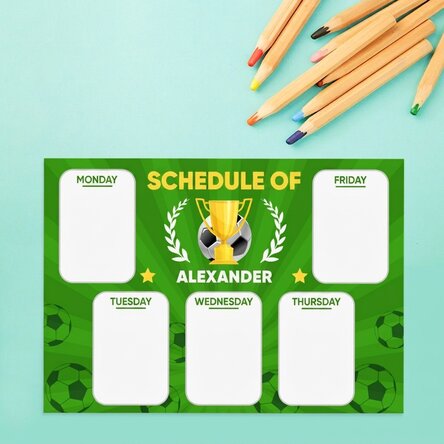
Personalised timetable with a photo and text - Jungle
Create the most original programme!
2.47 €
Κωδικός προϊόντος: 12687
Κωδικός προϊόντος: 12687


Μπορεί να σε ενδιαφέρει επίσης...




Τα πιο πρόσφατα προϊόντα...


Περιγραφή προϊόντος
The best way to keep track of all your school hours is to have a well-established and structured timetable that is as simple as possible. Why waste time creating a timetable when you can easily personalise one?
You can surprise your child with a personalised timetable with their name on it, and they will surely be delighted to create it in a neat or colourful way, perfect for displaying in a prominent place to remind them of their classes and activities.
What can I personalise?
The timetable can be personalised with a photo and text.
How can I personalise it?
Step 1: Click on the "Personalisation" button
Step 2: Click on the sample photo and then click on the green button at the bottom "Upload photos" (The images will be saved for future use)
Step 3: Select the photos from your computer, phone or tablet. The upload will start immediately.
Step 4: Choose a section of the product where you want to use the image.
Step 5: Choose the photo you want to appear in the selected section.
Step 6: If necessary, you can edit the photo by changing its position, zoom or rotation.
Step 7: When you are satisfied with the result, click on the "Confirm" button
. Step 8: Click on the sample text and edit the custom message.
Step 9: Once you have finished customising, click on the "Finish" button and add the product to your basket.
A4 format - 29.7 x 21 cm on 250g paper / 250g paper on magnetic sheet
A3 - 42 x 29.7 cm on 250g paper
You can surprise your child with a personalised timetable with their name on it, and they will surely be delighted to create it in a neat or colourful way, perfect for displaying in a prominent place to remind them of their classes and activities.
What can I personalise?
The timetable can be personalised with a photo and text.
How can I personalise it?
Step 1: Click on the "Personalisation" button
Step 2: Click on the sample photo and then click on the green button at the bottom "Upload photos" (The images will be saved for future use)
Step 3: Select the photos from your computer, phone or tablet. The upload will start immediately.
Step 4: Choose a section of the product where you want to use the image.
Step 5: Choose the photo you want to appear in the selected section.
Step 6: If necessary, you can edit the photo by changing its position, zoom or rotation.
Step 7: When you are satisfied with the result, click on the "Confirm" button
. Step 8: Click on the sample text and edit the custom message.
Step 9: Once you have finished customising, click on the "Finish" button and add the product to your basket.
A4 format - 29.7 x 21 cm on 250g paper / 250g paper on magnetic sheet
A3 - 42 x 29.7 cm on 250g paper
Κριτικές
Γράψτε μια κριτική
Κριτικές
Γράψτε μια κριτική
Verified buyer
Personalised timetable with a photo and text - Jungle
Sunt frumoase
Tricoul personalizat, Ρουμανία
Verified buyer
Personalised timetable with a photo and text - Jungle
Profesionalism, promptitudine
Jane, Ρουμανία
Verified buyer
Personalised timetable with a photo and text - Jungle
Foarte prompți
Produsele foarte calitative
Adina, Ρουμανία
Verified buyer
Personalised timetable with a photo and text - Jungle
Sunteți rapizi, iar obiectele sunt de foarte bună calitate.
Ioana, Ρουμανία
Verified buyer
Personalised timetable with a photo and text - Jungle
Produsele au o calitate exceptionala iar timpul de livrare ... super rapid .
Cristache Ileana, Ρουμανία
Verified buyer
Personalised timetable with a photo and text - Jungle
Le-aș recomanda fără ezitare! Au fost exact cum mi-am dorit și au arătat superb pe sticlă. 🥰
Popescu Beatrissa, Ρουμανία














 Ρουμανία




 Βουλγαρία



 Γαλλία


 Ολλανδία